Articles by "Software Eng"
Showing posts with label Software Eng. Show all posts
Print Friendly and PDF
Place where all sort of programming stuff and reviews,technology news are shared and Useful Project of C++,C,java C# etc
Definition
A context diagram is a simple graph where nodes represent system components and edges represent connections through shared phenomena declared by the labels (DeMarco, 1978; Jackson, 2001).

For example

The Initiator component controls the meetingRequest event, whereas the Scheduler component monitors it; the Scheduler component controls the constraintsRequest event, whereas the Participant component controls the constraintsSent event.

context diagram
A component in general does not interact with all other components. A context diagram provides a simple visualization of the direct environment of each component; that is, the set of 'neighbour' components with which it interacts, together with their respective interfaces.
no image
Place where all sort of programming stuff and reviews,technology news are shared and Useful Project of C++,C,java C# etc
Definition :

 Inconsistencies are the rule that  violate a consistency rule that links them explicitly or implicitly.

Types of inconsistency

Different types of consistency rule define different types of inconsistency: 


  • Terminology clash
  • Designation clash 
  • Structure clash
  • Strong conflict
  • Week conflict

Terminology clash

 The same concept is given different names in different statements.  For example, one statement states some condition for 'participating' in a meeting whereas another statement states an apparently similar or related condition for 'attending' a meeting. 

Designation clash

The same name designates different concepts in different statements. For example, one stakeholder interprets 'meeting participation' as full participation until the meeting ends, whereas another interprets it as partial participation. 

Structure clash

The same concept is given different structures in different statements. For example, one statement speaks of a participant's excluded dates as 'a set of time points', whereas another speaks of it as 'a set of time intervals'

Strong conflict

 There are statements that cannot be satisfied when taken together; their logical conjunction evaluates to false in all circumstances. This amounts to classical inconsistency in logic. In our meeting scheduler, there would be a strong conflict between one statement stating that 'the constraints of a participant may not be disclosed to anyone else' and another stating that 'the meeting initiator should know the participants' constraints'. (Those statements might originate from stakeholders having the participant's and initiator's viewpoint, respectively.) 

Weak conflict or divergence. There are statements that are not satisfiable together under some condition. This condition, called a boundary condition, captures a particular combination of circumstances that makes the statements strongly conflicting when it becomes true. The boundary condition must be feasible; that is, it can be made true

Place where all sort of programming stuff and reviews,technology news are shared and Useful Project of C++,C,java C# etc
Software engineering is a systematic approach to the production of software that takes into account practical cost, schedule, and dependability issues, as well as the needs of software customers and producers. How this systematic approach is actually implemented varies dramatically depending on the organization developing the software, the type of software, and the people involved in the development process. 


Software engineering diversity

There are no universal software engineering methods and techniques that are suit-able for all systems and all companies. Rather, a diverse set of software engineering methods and tools has evolved over the past 50 years

Perhaps the most significant factor in determining which software engineering methods and techniques are most important is the type of application that is being developed. 

There are many different types of application including: 

I. Stand-alone applications These are application systems that run on a local computer. such as a PC. They include all necessary functionality and do not need to be connected to a network. Examples of such applications are office applications on a PC, CAD programs, photo manipulation software, etc. 

2. Interactive transaction-based applications These are applications that execute on a remote computer and that are accessed by users from their own PCs or terminals. Obviously, these include web applications such as e-commerce applications where you can interact with a remote system to buy goods and services. This class of application also includes business systems, where a business provides access to its systems through a web browser or special-purpose client program and cloud-based services, such as mail and photo sharing. Interactive applications often incorporate a large data store that is accessed and updated in each transaction. 


3. Embedded control systems These are software control systems that control and manage hardware devices. Numerically, there are probably more embedded systems than any other type of system. Examples of embedded systems include the software in a mobile (cell) phone, software that controls anti-lock braking in a car, and software in a microwave oven to control the cooking process. 

4. Batch processing systems These are business systems that are designed to process data in large batches. They process large numbers of individual inputs to create corresponding outputs. Examples of batch systems include periodic billing systems, such as phone billing systems, and salary payment systems. 

5. Entertainment systems These are systems that are primarily for personal use and which are intended to entertain the user. Most of these systems are games of one kind or another. The quality of the user interaction offered is the most important distinguishing characteristic of entertainment systems. 

6. Systems for modeling and simulation These are systems that are developed by scientists and engineers to model physical processes or situations, which include many, separate, interacting objects. These are often computationally intensive and require high-performance parallel systems for execution. 

7. Data collection systems 'These are systems that collect data from their environment using a set of sensors and send that data to other systems for processing. The software has to interact with sensors and often is installed in a hostile environment such as inside an engine or in a remote location. 


8. Systems of systems These are systems that are composed of a number of other software systems. Some of these may be generic software products, such as a spreadsheet program. Other systems in the assembly may be specially written for that environment. 

Of course, the boundaries between these system types are blurred. If you develop a game for a mobile (cell) phone, you have to take into account the same constraints (power, hardware interaction) as the developers of the phone software. Batch processing systems are often used in conjunction with web-based systems. For example, 

in a company, travel expense claims may be submitted through a web application but processed in a batch application for monthly payment. 

You use different software engineering techniques for each type of system because the software has quite different characteristics. For example, an embedded control system in an automobile is safety-critical and is burned into ROM when installed in the vehicle. It is therefore very expensive to change. Such a system needs very extensive verification and validation so that the chances of having to recall cars after sale to fix software problems are minimized. User interaction is minimal (or perhaps nonexistent) so there is no need to use a development process that relies on user interface prototyping. 
For a web-based system, an approach based on iterative development and delivery may be appropriate, with the system being composed of reusable components. However, such an approach may be impractical for a system of systems, where detailed specifications of the system interactions have to be specified in advance so that each system can be separately developed. 
Nevertheless, there are software engineering fundamentals that apply to all types of software system: 

1. They should be developed using a managed and understood development process. The organization developing the software should plan the development process and have clear ideas of what will be produced and when it will be completed. Of course, different processes are used for different types of software. 

2. Dependability and performance are important for all types of systems. Software should behave as expected, without failures and should be available for use when it is required. It should be safe in its operation and, as far as possible, should be secure against external attack. The system should perform efficiently and should not waste resources. 

3. Understanding and managing the software specification and requirements (what the software should do) are important. You have to know what different customers and users of the system expect from it and you have to manage their expectations so that a useful system can be delivered within budget and to schedule.


4. You should make as effective use as possible of existing resources. This means that, where appropriate, you should reuse software that has already been developed rather than write new software. 

These fundamental notions of process, dependability, requirements, management, and reuse are important themes of this book. Different methods reflect them in different ways but they underlie all professional software development. You should notice that these fundamentals do not cover implementation and programming. I don't cover specific programming techniques in this book because these vary dramatically from one type of system to another. For example, a scripting language such as Ruby is used for web-based system programming but would be completely inappropriate for embedded systems engineering. 

Place where all sort of programming stuff and reviews,technology news are shared and Useful Project of C++,C,java C# etc

Software Engineering: Triangle

What is “quality"?

In the context of software engineering, software quality refers to two related but distinct notions that exist wherever quality is defined in a business context: Software functional quality reflects how well it complies with or conforms to a given design, based on functional requirements or specifications.                                                           
                                             
                                               
 What is Software Quality And Defects Leading to Crisis ?

Software Quality Assurance

Software quality assurance (SQA) consists of a means of monitoring the software engineering processes and methods used to ensure quality. The methods by which this is accomplished are many and varied, and may include ensuring conformance to one or more standards, such as ISO 9000 or a model such as CMMI.

The function of software quality that assures that the standards, processes, and procedures are appropriate for the project and are correctly implemented. 

This definition is taken from Software Definitions at NASA 


“Set of systematic activities providing evidence of the ability of the software process to produce a software product that is fit to use”
G. Schulmeyer and J. McManus, Software Quality Handbook, Prentice Hall, 1998.

IEEE Glossary: Degree to which a system, component, or process meets (1) specified requirements, and (2) customer or user needs or expectations

ISO: the totality of features and characteristics of a product or service that bear on its ability to satisfy specified or implied needs

Why Software Projects Fail ??


  • Unclear requirements: “Most people don’t know what to build because they’ve never defined it. When they build the software, it fails because it doesn’t meet people’s needs.”
  • Poor Design: It is vital to spend time to create a good design. Not having a good design leads to ongoing changes throughout the development phase. When this happens time and budget are consumed at a very rapid rate.
  •  Overly optimistic and/or unrealistic schedules. “People rush or skip things if the schedule isn’t realistic. Also, companies are panicking due to the economy. They’re compressing projects and schedules.”
  •  Lack of user input: This links back to requirements mistake #1. “Developers don’t talk to people who are going to use the software.”
  • Lack of executive sponsorship and support: “When management doesn’t support and protect the project, it can often be undermined by internal politics and budget cuts.”
  •  Turnover and layoffs: “Projects often fail when key people leave the project early in its lifetime.” Companies’ modern habit of laying off senior and, thus, higher-paid workers -– such as senior developers –- in favor of less experienced

And its all about:

 Bad software Engineering Practices

SQA IS THE MOTHER OF ALL  ENGINEERING ACTIVITIES

Bugs Vs Defects

  • A bug is the result of a coding error
  • A defect is a deviation from the requirements
That is: A defect does not necessarily mean there is a bug in the code, it could be a function that was not implemented but defined in the requirements of the software

What is Software?

                   Computer software, or just software, is a collection of computer programs and related data that provide the instructions telling a computer what to do and how to do it. We can also say software refers to one or more computer programs and data held in the storage of the computer for some purposes. In other words software is a set of programs, procedures, algorithms and its documentation 
Some Disasters due to Software Defects

Mariner Bugs Out (1962)
Cost: $18.5 million

  What NASA's website describes as "improper operation of the Atlas airborne beacon equipment" caused the booster to lose contact with one of the guidance systems on the ground, setting the stage for an apparent software-related guidance system failure. The role of software error in the launch failure remains somewhat mysterious in nature, shrouded in the ambiguities and conflicts among (and in some accounts, even within) the various accounts, official and otherwise 

A programmer incorrectly transcribed a handwritten formula into computer code, missing a single superscript bar.  Without the smoothing function indicated by the bar, the software treated normal variations of velocity as if they were serious, causing faulty corrections that sent the rocket off course 

CIA Gives the Soviets Gas (1982)
Cost: Millions of dollars, significant damage to Soviet economy
Disaster: Control software went haywire and produced intense pressure in the Trans-Siberian gas pipeline, resulting in the largest man-made non-nuclear explosion in Earth’s history.
Cause: CIA operatives allegedly planted a bug in a Canadian computer system purchased by the Soviets to control their gas pipelines.  The purchase was part of a strategic Soviet plan to steal or covertly obtain sensitive U.S. technology.  When the CIA discovered the purchase, they sabotaged the software so that it would pass Soviet inspection but fail in operation.

World War III… Almost (1983)
Cost: Nearly all of humanity
Disaster: The Soviet early warning system falsely indicated the United States had launched five ballistic missiles.  Fortunately the Soviet duty officer had a “funny feeling in my gut” and reasoned if the U.S. was really attacking they would launch more than five missiles, so he reported the apparent attack as a false alarm.

Cause: A bug in the Soviet software failed to filter out false missile detections caused by sunlight reflecting off cloud-tops

Patriot Fails Soldiers (1991)

Cost: 28 soldiers dead, 100 injured
Disaster: During the first Gulf War, an American Patriot Missile system in Saudi Arabia failed to intercept an incoming Iraqi Scud missile. The missile destroyed an American Army barracks.
Cause: A software rounding error incorrectly calculated the time, causing the Patriot system to ignore the incoming Scud missile

Y2K (1999)

Cost: $500 billion
Disaster: One man’s disaster is another man’s fortune, as demonstrated by the infamous Y2K bug.  Businesses spent billions on programmers to fix a glitch in legacy software.  While no significant computer failures occurred, preparation for the Y2K bug had a significant cost and time impact on all industries that use computer technology.
Cause: To save computer storage space, legacy software often stored the year for dates as two digit numbers, such as “99″ for 1999.  The software also interpreted “00″ to mean 1900 rather than 2000, so when the year 2000 came along, bugs would result

Some Recent Software Failures in Pakistan

  • Passport issuance system
  • Online Admit Card for Exams in Punjab
  • NADRA system often sits down

Forecasted failures 2011 -2012

  • Organizations and governments worldwide will spend about 
  •  $1 trillion this year on IT projects. 
  • Recent data suggested only about 35 percent of those projects are likely to be completed on time and on budget, with all their originally specified features and functions. 
  • Many projects, perhaps 20 percent, will be abandoned, often after multimillion-dollar investments—and the biggest projects will fail most often.

 TAKEN FROM SEI                                                              

Some Famous Bugs

  • http://www.scientificamerican.com/article/pogue-5-most-embarrassing-software-bugs-in-history/
  • http://www.devtopics.com/20-famous-software-disasters/
  • http://royal.pingdom.com/2009/03/19/10-historical-software-bugs-with-extreme-consequences/

References

  • Software Quality: Analysis and Guidelines for Success by Capers Jones
  • Requirements Analysis and Specification by Alan M. Davis
  • A Practitioner’s Approach to Software Engineering by Roger Pressman
  • Software Engineering 6th Edition, by I. Sommerville, 2000
  • ‘Software Engineering Quality Practices’ by R. K. Kandt, Auerbach Publications, 2006

Place where all sort of programming stuff and reviews,technology news are shared and Useful Project of C++,C,java C# etc
The product that software professionals build and then support over the long term.

Software encompasses (1) instructions (computer programs) that when executed provide desired features, function, and performance; (2) data structures that enable the programs to adequately store and manipulate information and (3) documentation that describes the operation and use of the programs.

Software products

  • Generic products -Stand-alone systems that are marketed and sold to any customer who wishes to buy them. 
  • Examples – PC software such as editing, graphics programs, project management tools; CAD software; software for specific markets such as appointments systems for dentists. 
  • Customized products -Software that is commissioned by a specific customer to meet their own needs. 
  • Examples – embedded control systems, air traffic control software, traffic monitoring systems.

Why is Software Important?

  • The economies of ALL developed nations are dependent on software. 
  • More and more systems are software controlled ( transportation, medical, telecommunications, military, industrial, entertainment,) 
  • Software engineering is concerned with theories, methods, and tools for professional software development. 
  • Expenditure on software represents a 
  • significant fraction of GNP in all developed countries.

Software costs

  • Software costs often dominate computer system costs. The costs of software on a PC are often greater than the hardware cost. 
  • Software costs more to maintain than it does to develop. For systems with a long life, maintenance costs may be several times development costs. Software engineering is concerned with cost-effective software development

Features of Software?

Its characteristics that make it different from other things human being build.

Features of such logical system:

  • Software is developed or engineered, it is not manufactured in the classical sense which has quality problem. 
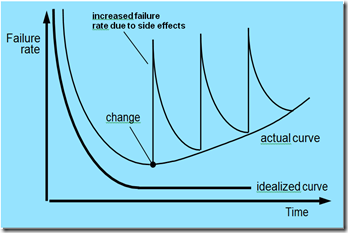
  • Software doesn't "wear out.” but it deteriorates (due to change). Hardware has bathtub curve of failure rate ( high failure rate in the beginning, then drop to steady state, then cumulative effects of dust, vibration, abuse occurs). Although the industry is moving toward component-based construction (e.g. standard screws and off-the-shelf integrated circuits), most software continues to be custom-built. Modern reusable components encapsulate data and processing into software parts to be reused by different programs. E.g. graphical user interface, window, pull-down menus in library etc.

Wear vs. Deterioration

Wear vs. Deterioration

                       Wear vs. Deterioration

Software Applications


  • System software:  such as compilers, editors, file management utilities Application software: stand-alone programs for specific needs. Engineering/scientific software: Characterized by “number crunching”algorithms. such as automotive stress analysis, molecular biology, orbital dynamics etc
  • Embedded software :resides within a product or system. (key pad control of a microwave oven, digital function of dashboard display in a car) 
  •  Product-line software :focus on a limited marketplace to address mass consumer market. (word processing, graphics, database management) 
  • WebApps: (Web applications) network-centric software. As web 2.0 emerges, more sophisticated computing environments is supported integrated with remote database and business applications. 
  • AI :software uses non-numerical algorithm to solve complex problem. Robotics, expert system, pattern recognition game playing

Software—New Categories


  • Open world computing—pervasive, ubiquitous, distributed computing due to wireless networking. How to allow mobile devices, personal computer, enterprise system to communicate across the vast network. 
  • Netsourcing—the Web as a computing engine. How to architect simple and sophisticated applications to target end-users worldwide. 
  • Open source—”free” source code open to the computing community (a blessing, but also a potential curse!) 

  1. Data mining 
  2. Grid computing 
  3. Cognitive machines 
  4. Software for nanotechnologies

          Software Engineering Definition

The seminal definition: Software engineering is the establishment and use of sound engineering principles in order to obtain economically software that is reliable and works efficiently on real machines

           The IEEE definition:

 Software Engineering: (1) The application of a systematic, disciplined, quantifiable approach to the development, operation, and maintenance of software; that is, the application of engineering to software. (2) The study of approaches as in (1).
Importance of Software Engineering
  • More and more, individuals and society rely on advanced software systems. We need to be able to produce reliable and trustworthy systems economically and quickly. 
  • It is usually cheaper, in the long run, to use software engineering methods and techniques for software systems rather than just write the programs as if it was a personal programming project. For most types of system, the majority of costs are the costs of changing the software after it has gone into use.

A Layered Technology

A Layered Technology


  • Any engineering approach must rest on an organizational commitment to quality which fosters a continuous process improvement culture. 
  • Process layer as the foundation defines a framework with activities for the effective delivery of software engineering technology. Establish the context where products (model, data, report, and forms) are produced, milestone are established, quality is ensured and change is managed. 
  • Method provides technical how-tos for building software. It encompasses many tasks including communication, requirement analysis, design modeling, program construction, testing, and support. 
  • Tools provide automated or semi-automated support for the process and methods.

Software Process

  • A process is a collection of activities, actions, and tasks that are performed when some work product is to be created. It is not a rigid prescription for how to build computer software. Rather, it is an adaptable approach that enables the people doing the work to pick and choose the appropriate set of work actions and tasks. 
  • The purpose of the process is to deliver software in a timely manner and with sufficient quality to satisfy those who have sponsored its creation and those who will use it.

Five Activities of a Generic Process framework


  • Communication: communicate with customer to understand objectives and gather requirements 
  • Planning: creates a “map” defines the work by describing the tasks, risks and resources, work products and work schedule. 
  • Modeling: Create a “sketch”, what it looks like architecturally, how the constituent parts fit together and other characteristics. 
  • Construction: code generation and the testing. 
  • Deployment: Delivered to the customer who evaluates the products and provides feedback based on the evaluation. 

  • These five framework activities can be used to all software development regardless of the application domain, size of the project, complexity of the efforts etc, though the details will be different in each case.
  • For many software projects, these framework activities are applied iteratively as a project progresses. Each iteration produces a software increment that provides a subset of overall software features and functionality

Umbrella Activities

Complement the five process framework activities and help team manage and control progress, quality, change, and risk.
  • Software project tracking and control: assess progress against the plan and take actions to maintain the schedule. 
  • Risk management: assesses risks that may affect the outcome and quality. 
  • Software quality assurance: defines and conduct activities to ensure quality. 
  • Technical reviews: assesses work products to uncover and remove errors before going to the next activity. 
  • Measurement: define and collects process, project, and product measures to ensure stakeholder’s needs are met. 
  • Software configuration management: manage the effects of change throughout the software process. 
  • Reusability management: defines criteria for work product reuse and establishes mechanism to achieve reusable components. 
  • Work product preparation and production: create work products such as models, documents, logs, forms and lists.