
Articles by "Networks"
Showing posts with label Networks. Show all posts
Print Friendly and PDF
Place where all sort of programming stuff and reviews,technology news are shared and Useful Project of C++,C,java C# etc
Turn your Windows 10 PC into a mobile hotspot by sharing your Internet connection with other devices over Wi-Fi. You can share a Wi-Fi, Ethernet, or cellular data connection. If your PC has a cellular data connection and you share it, it will use data from your data plan.

  • Press the windows key +I
  • Select the menu Network & Internet
  • then select Mobile Hotspot from Menu 
  • For Share my Internet connection from, choose the Internet connection you want to share.
  • Select Edit > enter a new network name and password > Save.

Like this 
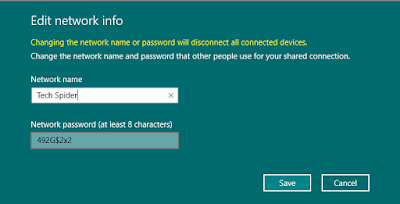
Use your PC as a mobile hotspot in windows 10

Turn on Share my Internet connection with other devices.
To connect on the other device, go to the Wi-Fi settings on that device, find your network name, select it, enter the password, and then connect.

Wi-Fi settings


Place where all sort of programming stuff and reviews,technology news are shared and Useful Project of C++,C,java C# etc

Presently it is difficult to surprise someone at home internet, or the presence of multiple computers. I think we all, set out to give access to the network to multiple devices, the question arises about how to install the router and set up a home network.The network usually starts with some sort of minimum unpretentious router models D-Link and successfully deal with the provision of access to home network devices. However, not all rest on our laurels network uptime and many are trying to bring their "Network" to some personal ideal. This is ideally what I want to talk about today.


I think we all have friends or acquaintances who are not even thinking about the safety of their Wi-Fi, and configure the same routers exactly to the moment when they access to the Internet. 


Once I had the need to share internet with friends who live in the same entryway. However, the option to let him into my Network does not suit me fundamentally. Since then we started thinking about upgrading the network equipment and the search options available routers with support for multiple independent networks.


Smiley face

 My choice fell on the company's products MikroTik. At first it was, like many, a broken version  on the computer, and then was purchased by the "iron" the router of the same manufacturer. Apart from trouble-free routing multiple subnets with customized filters and queues I configured it OpenVPN server to access your home network through the Internet, put NAS. This configuration gave more network usage scenarios and more than the average user's home network. 

The next step was the installation of similar routers in apartments with relatives or in the country, linking into a network via VPN tunnels and dynamic routing within them. This configuration allowed to spread geographically networked storage and configure backups, which increased the reliability of information storage (did not want to lose 400GB archive family photos and some other data), and made ​​it possible to introduce services like remote viewing ip camera in your secure network. Suddenly I found the ability to configure IPTV transport from one point of presence to another, where a local provider of such a service does not matter.
Place where all sort of programming stuff and reviews,technology news are shared and Useful Project of C++,C,java C# etc
If you want to determine the hosts per subnet for an IP address or see the binary representation of a subnet mask, IP class, and any other subnetting details, then this program will work great for you

Subnet Calculator


Attached below, is the source code for a fully functioning subnet calculator I created for easy determination of subnet details needed when in any IT college class or IT related networking position. It's accurate and functional, so please feel free to use it.

Features of Subnet Calculator: 

a.) Take a user IP Address and Subnet Mask

b.) Determine IP Address Class, as well as Private and Reserved address spaces.

c.) Shows Binary representation of both IP and Subnet Mask, stacked

d.) Shows the Network ID

e.) Shows the Network Increment value

f.) Shows usable host addresses for each subnet

g.) Shows amount of usable hosts per subnet

h.) Shows amount of subnets available for that each IP Class