Articles by "solution"
Showing posts with label solution. Show all posts
Print Friendly and PDF
no image
Place where all sort of programming stuff and reviews,technology news are shared and Useful Project of C++,C,java C# etc
if we put some alphabets then the program show that  capital lattes or small letters.  vowels and Consonants.

Solution :

#include <iostream>
using namespace std;
 
int main () {


    char ch;
    int isLowercaseVowel, isUppercaseVowel;

   
     cout<<"Enter any character: "<<endl;
     cin>>ch;
 
    if(ch>=65&&ch<=90)
        
   cout<<endl<<"You entered an uppercase character"<<endl;
    else
    
     if(ch>=48&&ch<=57)
     
        cout<<endl<<"You entered a digit"<<endl;
        
    else 
    
  if(ch>=97&&ch<=122)
  
        cout<<endl<<"You entered a lowercase character"<<endl;
        
    else
    
        cout<<endl<<"You entered a special character"<<endl;
        
        if( (ch>='a' && ch<='z') || (ch>='A' && ch<='Z'))
        
        cout<<"You entered an alphabet."<<ch<<endl;
        
    else
        cout<<"You entered  not an alphabet."<<ch<<endl;
        
        isLowercaseVowel = (ch == 'a' || ch == 'e' || ch == 'i' || ch == 'o' || ch == 'u');

         // evaluates to 1 (true) if c is an uppercase vowel
        isUppercaseVowel = (ch == 'A' || ch == 'E' || ch == 'I' || ch == 'O' || ch == 'U');
        
       if (isLowercaseVowel || isUppercaseVowel)
       
        cout<<"yor given character  is a vowel."<< ch<<endl;
        
     else
        cout<<"yor given character is a consonant."<<ch<<endl;
        
    return 0;
  
}
no image
Place where all sort of programming stuff and reviews,technology news are shared and Useful Project of C++,C,java C# etc
#include<iostream>
using namespace std;
int main() {
int x, y;

printf("\nEnter value for num1 & num2 : ");
scanf("%d %d", &x, &y);

x= x+ y;
y = x - y;
x = x- y;

printf("\nAfter swapping value of x : %d", x);
printf("\nAfter swapping value of y : %d", y);

return (0);
}


Output:

Enter value for num1 & num2 : 21 12
After swapping value of x : 12
After swapping value of y : 21
no image
Place where all sort of programming stuff and reviews,technology news are shared and Useful Project of C++,C,java C# etc
18.3 Distinguish between connection-oriented and connectionless network services. ?

ANS: Connection-oriented services maintain a connection while data is being transferred.
Connectionless services do not maintain a connection. Connection-oriented services are generally slower but more reliable.


18.4 How does a client determine the host name of the client computer?
ANS: InetAddress.getLocalHost().getHostName().

18.5 Under what circumstances would a SocketException be thrown?
ANS: If a DatagramSocket cannot be constructed properly, a SocketException is
thrown.

18.6 How can a client get a line of text from a server?
ANS: Through the Socket using a stream object (e.g., such as ObjectInputStream).

18.7 Describe how a client connects to a server.

ANS: A client can read a file through a URL connection by creating a URL object and issuing an openStream method call on the URL object. The openStream call returns an InputStream object that can be used to read bytes from the file. Also, a DataInputStream object can be chained to the InputStream returned from openStream to allow other data types to be read from the file on the server.

18.8 Describe how a server sends data to a client.?

ANS: A client connects to the server by creating a socket using the Socket class constructor. The name of the server and the port to connect to are passed to the Socket constructor.
Information can be exchanged between the client and server using the socket’s InputStream and OutputStream.

18.9 Describe how to prepare a server to receive a stream-based connection request from a single client.?

ANS: First a ServerSocket object must be created and associated with a port on the server
computer. If the ServerSocket is created properly, a call to the accept method can be issued on the ServerSocket object. This call will wait for a client to connect. When a client
connects, a Socket object is returned from the accept call. The Socket object is used to
get the InputStream and OutputStream objects for communication with the client.

18.10 Describe how to prepare a server to receive connection requests from multiple clients if each client that connects should be processed concurrently with all other connected clients.?

ANS: First a ServerSocketChannel object must be created and associated with a port on
the server computer, configure the channel so that it works in nonblocking mode. Then register a Selector (the interest set contains OP_ACCEPT operation) to the channel. If the
ServerSocketChannel is created properly and ready to accept new connections, a call to the accept method can be issued on the ServerSocketChannel, a SocketChannel object is returned from the accept call. The SocketChannel object is used to communicate with the client.

18.11 How does a server listen for connections at a port?
ANS: The ServerSocket accept method (or the ServerSocketChannel accept method) is used.

18.12 What determines how many connect requests from clients can wait in a queue to connect to
a server?

ANS: When the ServerSocket object is created on the server, the second argument to the
ServerSocket constructor specifies the "queue length" (the number of clients that can wait
to be processed by the server).


18.13 As described in the text, what reasons might cause a server to refuse a connection request from a client?

ANS: A server usually has a capacity of the number of clients that can wait for a connection
and be processed by the server. If the queue of clients is full, client connections are refused.
Place where all sort of programming stuff and reviews,technology news are shared and Useful Project of C++,C,java C# etc
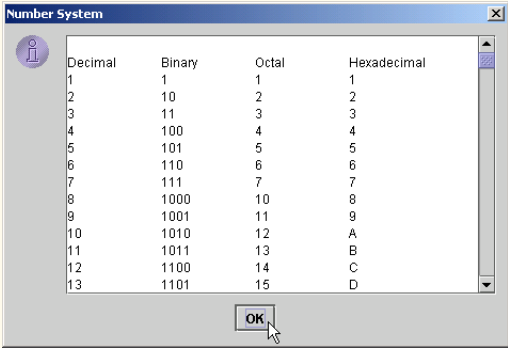
Write an application that prints a table of the binary, octal, and hexadecimal equivalents of
the decimal numbers in the range 1 through 256. If you are not familiar with these number systems, read Appendix C first. Place the results in a JTextArea with scrolling functionality. Display the JTextArea in a message dialog.


Number System in java


ANS:

import javax.swing.*;
public class NumberSystem {

public static void main( String args[] )
 {
 // create a scrolled pane for the output
JTextArea outputTextArea = new JTextArea( 15, 35 );
JScrollPane scroller = new JScrollPane( outputTextArea );
outputTextArea.append( "\nDecimal\tBinary\tOctal\tHexadecimal\n" );

 // print out binary, octal and hexadecimal representation
 // for each number
for ( int i = 1; i <= 256; i++ ) {
 int decimal = i;
 String binary = "", octal = "", hexadecimal = "";
 int temp;

 // get binary representation
 while ( decimal >= 2 ) {
 temp = decimal % 2;
 binary = temp + binary;
 decimal /= 2;
 }
 binary = decimal + binary;

decimal = i;

 // get octal representation
 while ( decimal >= 8 ) {
 temp = decimal % 8;
 octal = temp + octal;
 decimal /= 8;
 }
octal = decimal + octal;

 decimal = i;

 // get hexadecimal representation
 while ( decimal >= 16 ) {
 temp = decimal % 16;

switch ( temp ) {
 case 10:
hexadecimal = "A" + hexadecimal;
 break;
 case 11:
hexadecimal = "B" + hexadecimal;
 break;
 case 12:
hexadecimal = "C" + hexadecimal;
 break;
 case 13:
hexadecimal = "D" + hexadecimal;
 break;
case 14:
hexadecimal = "E" + hexadecimal;
 break;
 case 15:
 hexadecimal = "F" + hexadecimal;
 break;
default:
hexadecimal = temp + hexadecimal;
 break;
 }
 decimal /= 16;
 }
 switch ( decimal ) 
{
 case 10:
hexadecimal = "A" + hexadecimal;
 break;
case 11:
hexadecimal = "B" + hexadecimal;
 break;
case 12:
hexadecimal = "C" + hexadecimal;
break;
case 13:
 hexadecimal = "D" + hexadecimal;
 break;
 case 14:
 hexadecimal = "E" + hexadecimal;
 break;
 case 15:
 hexadecimal = "F" + hexadecimal;
 break;
 default:
 hexadecimal = decimal + hexadecimal;
 break;
 }
 outputTextArea.append( i + "\t" + binary + "\t" + octal + "\t" + hexadecimal + "\n" );
 }
 // show result
 JOptionPane.showMessageDialog( null, scroller,
 "Number System", JOptionPane.INFORMATION_MESSAGE );
// terminate the application
System.exit( 0 );
}
} // end class NumberSystem
Place where all sort of programming stuff and reviews,technology news are shared and Useful Project of C++,C,java C# etc

In this articles, I am using Listbox ,radio box ,check box,and textbox  Admission Form

Admission Form with List Box using C#

Program

using System;
using System.Collections.Generic;
using System.ComponentModel;
using System.Data;
using System.Drawing;
using System.Linq;
using System.Text;
using System.Threading.Tasks;
using System.Windows.Forms;

namespace Admission_Form_with_List_Box
{
     public partial class frmAdmission : Form
     {
          public frmAdmission()
          {
               InitializeComponent();
          }

          private void btnDisplay_Click(object sender, EventArgs e)
          {
               double mobt = 0, mtot = 0,
                         iobt = 0, itot = 0,
                         bobt = 0, btot = 0,
                         merit = 0;
               int hafiz = 0, computer = 0;
               if (chkHafiz.Checked)
               {
                    hafiz = 20;
               }
               if (chkComputer.Checked)
               {
                    computer = 10;
               }
               if (lstProgram.SelectedIndex != -1)
               {
                    if (lstProgram.SelectedItem.ToString() == "BS( CS )")
                    {
                         iobt = Convert.ToDouble(txtIObt.Text);
                         itot = Convert.ToDouble(txtITot.Text);
                         merit = (iobt + hafiz) / itot * 100;
                         txtMerit.Text = merit.ToString();
                         if (merit > 80)
                         {
                              txtRemarks.Text = "Congratulations...!";
                         }
                         else
                         {
                              txtRemarks.Text = "Wait for other merit list";
                         }
                    }
                    else if (lstProgram.SelectedItem.ToString() == "MCS")
                    {
                         mobt = Convert.ToDouble(txtMObt.Text);
                         mtot = Convert.ToDouble(txtMTot.Text);
                         merit += mobt / mtot * 30;
                         iobt = Convert.ToDouble(txtIObt.Text);
                         itot = Convert.ToDouble(txtITot.Text);
                         merit += iobt / itot * 30;
                         bobt = Convert.ToDouble(txtBObt.Text);
                         btot = Convert.ToDouble(txtBTot.Text);
                         merit += (bobt + hafiz + computer) / btot * 40;
                         txtMerit.Text = merit.ToString();
                         if (merit > 71)
                         {
                              txtRemarks.Text = "Congratulations...!";
                         }
                         else
                         {
                              txtRemarks.Text = "Wait for other merit list";
                         }
                    }
               }
          }

          private void lstProgram_SelectedIndexChanged(object sender, EventArgs e)
          {
               if (lstProgram.SelectedIndex != -1)
               {
                    if (lstProgram.SelectedItem.ToString() == "BS( CS )")
                    {
                         txtAppNo.Enabled = true;
                         txtName.Enabled = true;
                         txtMObt.Enabled = false;
                         txtMTot.Enabled = false;
                         txtIObt.Enabled = true;
                         txtITot.Enabled = true;
                         txtBObt.Enabled = false;
                         txtBTot.Enabled = false;
                    }
                    else if (lstProgram.SelectedItem.ToString() == "MCS")
                    {
                         txtAppNo.Enabled = true;
                         txtName.Enabled = true;
                         txtMObt.Enabled = true;
                         txtMTot.Enabled = true;
                         txtIObt.Enabled = true;
                         txtITot.Enabled = true;
                         txtBObt.Enabled = true;
                         txtBTot.Enabled = true;
                    }
               }
          }

          private void frmAdmission_Load(object sender, EventArgs e)
          {
               txtAppNo.Enabled = false;
               txtName.Enabled = false;
               txtMObt.Enabled = false;
               txtMTot.Enabled = false;
               txtIObt.Enabled = false;
               txtITot.Enabled = false;
               txtBObt.Enabled = false;
               txtBTot.Enabled = false;
          }

          private void btnClear_Click(object sender, EventArgs e)
          {
               lstProgram.ClearSelected();
               txtAppNo.Clear();
               txtName.Clear();
               txtAppNo.Enabled = false;
               txtName.Enabled = false;
               rdoMale.Checked = false;
               rdoFemale.Checked = false;
               chkComputer.Checked = false;
               chkHafiz.Checked = false;
               txtMObt.Enabled = false;
               txtMTot.Enabled = false;
               txtIObt.Enabled = false;
               txtITot.Enabled = false;
               txtBObt.Enabled = false;
               txtBTot.Enabled = false;
               txtMerit.Enabled = false;
               txtRemarks.Enabled = false;
               txtMObt.Clear();
               txtMTot.Clear();
               txtIObt.Clear();
               txtITot.Clear();
               txtBObt.Clear();
               txtBTot.Clear();
               txtMerit.Clear();
               txtRemarks.Clear();
          }

          private void btnExit_Click(object sender, EventArgs e)
          {
               this.Close();
          }
    }
}
Place where all sort of programming stuff and reviews,technology news are shared and Useful Project of C++,C,java C# etc
This article shows you how to insert, update, delete,search by name ,Roll no,marks and display data in Listbox 


Insert Update Delete and Search Data in local databases Using C#

Introduction

Here I am using  local databases.
Note: You need to include this assembly reference.
 using MySql.Data.MySqlClient;

SQL Connection: 

First, you need to  establish Local database connection for  databases 


namespace SQL_Database
{
    public partial class Form1 : Form
    {// Delcare Sql class objects
        SqlConnection cn;
        SqlDataAdapter da;
        DataSet ds;
        public Form1()
        {
            InitializeComponent();
        }

        private void Form1_Load(object sender, EventArgs e)
        {
            String con_str = @"Data Source=(local);Initial Catalog=BZU;Integrated Security=True";
            cn = new SqlConnection(con_str);

            try
            {
                cn.Open();   // open database connection
            }
            catch (Exception ex)
            {
                MessageBox.Show(ex.Message);
            }
        }

Insert Data

private void button1_Click(object sender, EventArgs e)
        {
            String query = "Insert into Student(RollNo, Name, Marks) Values(@RollNo, @Name, @Marks)";
            SqlCommand cmd = new SqlCommand(query, cn);

            cmd.Parameters.Add("@RollNo", SqlDbType.VarChar, 15);
            cmd.Parameters.Add("@Name", SqlDbType.VarChar, 50);
            cmd.Parameters.Add("@Marks", SqlDbType.Int);

            cmd.Parameters["@RollNo"].Value = textBox1.Text;
            cmd.Parameters["@Name"].Value = textBox2.Text;
            cmd.Parameters["@Marks"].Value = textBox3.Text;

            try
            {
                int i = cmd.ExecuteNonQuery();
                if (i == 0)
                    MessageBox.Show("No Record inserted");
                if (i == 1)
                    MessageBox.Show("One Record inserted into database Successfully");
                ClearFields();
            }
            catch (SqlException ex)
            {
                MessageBox.Show(ex.Message);
            }
        }
        private void ClearFields()
        {
            textBox1.Clear();
            textBox2.Clear();
            textBox3.Clear();
        }

Update Data

 private void button2_Click(object sender, EventArgs e)
        {
            string query = "Update Student Set Name=@Name,Marks=@Marks where RollNo=@RollNo ";
            SqlCommand cmd = new SqlCommand(query, cn);

            cmd.Parameters.Add("@Name", SqlDbType.VarChar, 50);
            cmd.Parameters.Add("@Marks", SqlDbType.Int);
            cmd.Parameters.Add("@RollNo", SqlDbType.VarChar, 15);

            cmd.Parameters["@Name"].Value = textBox2.Text;
            cmd.Parameters["@Marks"].Value = int.Parse(textBox3.Text);
            cmd.Parameters["@RollNo"].Value = textBox1.Text;
            try
            {
                int i = cmd.ExecuteNonQuery();
                if (i == 0)
                    MessageBox.Show("Record not found");
                if (i == 1)
                    MessageBox.Show("One Record updated successfully");
                ClearFields();
            }

            catch (SqlException ex)
            {
                MessageBox.Show(ex.Message);
            }
        }


Delete Data

private void button3_Click(object sender, EventArgs e)
        {
            String query = "Delete from Student Where RollNo=@RollNo";
            SqlCommand cmd = new SqlCommand(query, cn);
            cmd.Parameters.Add("@RollNo", SqlDbType.VarChar, 10);
            cmd.Parameters["@RollNo"].Value = textBox1.Text;

            try
            {
                int i = cmd.ExecuteNonQuery();
                if (i == 0)
                    MessageBox.Show("Record not found");
                if (i == 1)
                    MessageBox.Show("One Record Deleted Successfully");
                ClearFields();
            }
            catch (SqlException ex)
            {
                MessageBox.Show(ex.Message);
            }
        }

Display Data

   private void button6_Click(object sender, EventArgs e)
        {
            try
            {
                String query = "Select * from Student";
                da = new SqlDataAdapter(query, cn);
                ds = new DataSet();
                da.Fill(ds, "Students");
                dgStudent.DataSource = ds;
                dgStudent.DataMember = "Students";
                dgStudent.Refresh();
            }
            catch (SqlException ex)
            {
                MessageBox.Show(ex.Message);
            }
        }
Search By Name

private void button5_Click(object sender, EventArgs e)
        {
            String query = "Select * from Student where Name = @Name";
            SqlCommand cmd = new SqlCommand(query, cn);

            cmd.Parameters.Add("@Name", SqlDbType.VarChar, 50);
            cmd.Parameters["@Name"].Value = textBox2.Text; 
            SqlDataAdapter da = new SqlDataAdapter();
            da.SelectCommand = cmd;

            try
            {
                DataSet ds = new DataSet();
                da.Fill(ds, "Students");
                dgStudent.DataSource = ds;
                dgStudent.DataMember = "Students";
                dgStudent.Refresh();
            }
            catch (SqlException ex)
            {
                MessageBox.Show(ex.Message);
            }
        }

Search By RollNo

private void button4_Click(object sender, EventArgs e)
        {
            String query = "Select * from Student where RollNo = @RollNo";
            SqlCommand cmd = new SqlCommand(query, cn);

            cmd.Parameters.Add("@RollNo", SqlDbType.VarChar, 10);
            cmd.Parameters["@RollNo"].Value = textBox1.Text;
            SqlDataAdapter da = new SqlDataAdapter();
            da.SelectCommand = cmd;

            try
            {
                DataTable dt = new DataTable();
                da.Fill(dt);
                if (dt.Rows.Count == 0)
                    MessageBox.Show("Record not found");
                else
                {
                    textBox2.Text = dt.Rows[0]["Name"].ToString();
                    textBox3.Text = dt.Rows[0]["Marks"].ToString();
                }
            }
            catch (SqlException ex)
            {
                MessageBox.Show(ex.Message);
            }
        }

Search By Marks

private void button7_Click(object sender, EventArgs e)
        {
            String query = "Select * from Student where Marks = @Marks";
            SqlCommand cmd = new SqlCommand(query, cn);

            cmd.Parameters.Add("@Marks", SqlDbType.Int);
            cmd.Parameters["@Marks"].Value = Convert.ToInt32(textBox3.Text);
            SqlDataAdapter da = new SqlDataAdapter();
            da.SelectCommand = cmd;

            try
            {
                DataSet ds = new DataSet();
                da.Fill(ds, "Students");
                dgStudent.DataSource = ds;
                dgStudent.DataMember = "Students";
                dgStudent.Refresh();
            }
            catch (SqlException ex)
            {
                MessageBox.Show(ex.Message);
            }
        }
Place where all sort of programming stuff and reviews,technology news are shared and Useful Project of C++,C,java C# etc
(Mortgage Calculator Application) A bank offers mortgages that can be repaid in 5 ,10, 15, 20, 25 or 30 years. Write an application that allows a user to enter the price of a house (the amount of the mortgage) and the annual interest rate. When the user clicks a Button, the application displays a table of the mortgage length in years together with the monthly payment.


Mortgage Calculator Application in C#

Solution :

using System;
using System.Collections.Generic;
using System.ComponentModel;
using System.Data;
using System.Drawing;
using System.Linq;
using System.Text;
using System.Threading.Tasks;
using System.Windows.Forms;

namespace Mortgage_Calculator_Application
{
    public partial class Form1 : Form
    {
        public Form1()
        {
            InitializeComponent();
        }

        private void button1_Click(object sender, EventArgs e)
        {

            int intMortgageAmount = 0; // house price
            double dblAnnualRate = 0; // annual interest rate
            double dblMonthlyRate = 0;
            decimal decPayment = 0; // monthly payment amount
            int intYears = 5; // years in mortgage
            int intMonths = 0;
            
            intMortgageAmount = Int32.Parse(txtMortgageAmount.Text);
            dblAnnualRate = Double.Parse(txtRate.Text) / 100;
            // calculate monthly interest rate
            dblMonthlyRate = dblAnnualRate / 12;
            lstResults.Items.Clear();
            lstResults.Items.Add(
            "Mortgage Length (Years)\tMonthly Payment");
            // perform payment calculation and display result for
            // 5, 10, 15, 20, 25 and 30 years
            while (intYears <= 30)
            {
                // convert years to months for the calculation
                intMonths = intYears * 12;
                // perform calculation
                decPayment = (decimal)
                (intMortgageAmount * dblMonthlyRate * 
                Math.Pow(1 + dblMonthlyRate, intMonths) / 
               (Math.Pow(1 + dblMonthlyRate, intMonths)- 1));
               
                lstResults.Items.Add(intYears + "\t\t\t" +
                String.Format("{0:C}", decPayment));
                intYears += 5;
            } 
        } 

    }
    }