Articles by "simple program"
Showing posts with label simple program. Show all posts
Print Friendly and PDF
no image
Place where all sort of programming stuff and reviews,technology news are shared and Useful Project of C++,C,java C# etc
In this Article am describing how to integrate SMS API in C#  that can send SMS to your mobile phone within Pakistan.
 First go to this website and signup here

Here are the simple Steps that you follow  :

  1. First Launch a visual studio 
  2. Create a console Application in visual studio 
  3. After that first added assembly reference into your project

using System.Net;
using System.Web;
Here is Implementation

using System;
using System.Collections.Generic;
using System.Linq;
using System.Net;
using System.Text;
using System.Threading.Tasks;
using System.Web;
namespace ConsoleApp3
{
    class Program
    {
        static void Main(string[] args)
        {
            string MyUsername = "xxxx"; //Your Username At Sendpk.com 
            string MyPassword = "xxxx"; //Your Password At Sendpk.com 
            string toNumber = "xxxxx"; //Recepient cell phone number with country code 
            string Masking = "Tech Spider"; //Your Company Brand Name 
            string MessageText = "Application Done";
            string jsonResponse = SendSMS(Masking, toNumber, MessageText, MyUsername, MyPassword);
            Console.Write(jsonResponse);
            //Console.Read(); //to keep console window open if trying in visual studio 
            Console.ReadLine();
        }
        public static string SendSMS(string Masking, string toNumber, string MessageText, string MyUsername, string MyPassword)
        {
            String URI = "http://Sendpk.com" +
            "/api/sms.php?" +
            "username=" + MyUsername +
            "&password=" + MyPassword +
            "&sender=" + Masking +
            "&mobile=" + toNumber +
            "&message=" + Uri.UnescapeDataString(MessageText); // Visual Studio 10-15 
          
            try
            {
                WebRequest req = WebRequest.Create(URI);
                WebResponse resp = req.GetResponse();
                var sr = new System.IO.StreamReader(resp.GetResponseStream());
                return sr.ReadToEnd().Trim();
            }
            catch (WebException ex)
            {
                var httpWebResponse = ex.Response as HttpWebResponse;
                if (httpWebResponse != null)
                {
                    switch (httpWebResponse.StatusCode)
                    {
                        case HttpStatusCode.NotFound:
                            return "404:URL not found :" + URI;
                            break;
                        case HttpStatusCode.BadRequest:
                            return "400:Bad Request";
                            break;
                        default:
                            return httpWebResponse.StatusCode.ToString();
                    }
                }
            }
            return null;
            
        }
    
    }
   
    }
Place where all sort of programming stuff and reviews,technology news are shared and Useful Project of C++,C,java C# etc
Q No. 1 Write a program that takes a quadratic equation as input and return whether it has two distinct roots, a double root, or not roots Using if else Condition.

Solution:
1

Q No.2  write a program that reads a number, check if this number is divisible by 4 then display “OK”, otherwise display “ failure “.


Solution.

Q No.3 Write a program to display alphabet pattern like 'U' with an asterisk.
Solution:


Q No.4 Create a program to ask the user for a symbol and answer if it is a (lowercase) vowel, a digit, or any other symbol, using "switch".

Solution:

 
Q No.5 write an application that keeps track of our grocery list. It should save our grocery needs into an array, and then print the grocery list out for us when we run the application
 "eggs", "milk", "bread", "bananas", "cereal", "rice", "yogurt"

Solution:


no image
Place where all sort of programming stuff and reviews,technology news are shared and Useful Project of C++,C,java C# etc
Make a program that associates all 26 English alphabets A-Z with the index 1-26. User will enter a number from 1 to 26 and it will show the associated alphabet.

Solution:

using System;
using System.Collections.Generic;
using System.Linq;
using System.Text;
using System.Threading.Tasks;

namespace alpha
{
    class Program
    {
        static void Main(string[] args)
        {
            Console.WriteLine("Enter Number");
            while (true)
            {

                int number = Convert.ToInt32(Console.ReadLine());
                char[] alpha = { ' ', 'a', 'b', 'c', 'd', 'e', 'f', 'g', 'h', 'i', 'j', 'k', 'l', 'm', 'n', 'o', 'p', 'q', 'r', 's', 't', 'u', 'v', 'w', 'x', 'y', 'z' };

                if (number > 0 && number <= 26)
                {
                    for (int i = 1; i <= alpha.Length; i++)
                    {
                        if (i == number)
                        {
                            Console.WriteLine(alpha[i].ToString());
                        }
                    }

                }
                else
                {
                    Console.WriteLine("Invalid input");
                }

            }
            Console.ReadLine();
        }
    }
}


no image
Place where all sort of programming stuff and reviews,technology news are shared and Useful Project of C++,C,java C# etc
Create a new C# project and create a program that assigns values to the specific variables after checking that whether the input is integer, float, signed or unsigned.

Solution:

using System;
using System.Collections.Generic;
using System.Linq;
using System.Text;
using System.Threading.Tasks;

namespace alphabet
{
    class Program
    {
        static void Main(string[] args)
        {

            string a;
            Console.WriteLine("Enter the a");
            int result1;
            float result2;

            a = Console.ReadLine();

            if (int.TryParse(a, out result1) == true)
            {
                Console.WriteLine("Moved to int");

            }
            else if (float.TryParse(a, out result2) == true)
            {
                Console.WriteLine("Moved to float");
            }

            Console.ReadLine();
        }

    }

}

no image
Place where all sort of programming stuff and reviews,technology news are shared and Useful Project of C++,C,java C# etc
Write a program for a calculator that will be able to perform addition, subtraction, multiplication and division. Make a main menu. It should take float values from user as inputs and display outputs as a string after performing selected operation.

Solution:

using System;
using System.Collections.Generic;
using System.Linq;
using System.Text;
using System.Threading.Tasks;

namespace calculator
{
    class Program
    {
        static void Main(string[] args)
        {
            float a, b,c, result;
            Console.WriteLine("Add Sub Mult Div\n ");
            Console.WriteLine("Enter the a");
                a = float.Parse(Console.ReadLine());
            Console.WriteLine("Enter the b");
            b = float.Parse(Console.ReadLine());
            Console.WriteLine("1 for Add\n 2 for Sub\n 3 f0r Mult\n 4 for Div\n ");
            Console.WriteLine("Enter the c");
            c = float.Parse(Console.ReadLine());
           
            if (c==1)
            {
                result= a + b;
                Console.WriteLine(result);
            }
            if (c==2)
            {
                result = a - b;
                Console.WriteLine(result);
            }
            if (c==3)
            {
                result = a * b;
                Console.WriteLine(result);
            }
            if (c==4)
            {
                result = a / b;
                Console.WriteLine(result);

            }
            Console.ReadLine();


        }
    }
}


no image
Place where all sort of programming stuff and reviews,technology news are shared and Useful Project of C++,C,java C# etc

This is the simple program for twitter post analysis in this program analysis latest tweet on twitter 

Note: First Install Library tweepy into your PC than run it

Program :

import tweepy
from textblob import TextBlob
consumer_key='t4kfKNpNLojrcLD5BQVJsZ6FV'
consumer_secret='izwKDPBjeZAUCcKFjhU9F7EUFYVQaieTSMsSg0cJLb3zNcbNhW'
access_token='2444042389-BLj6mrSj2k1HfGWnJMDAp92yXmIuPjGwitZ8NHk'
access_token_secret='jvcDI5GjW69tteEG816e4OA1wpOR04hz277mmqUnO9hQT'
auth=tweepy.OAuthHandler
auth=tweepy.OAuthHandler(consumer_key,consumer_secret)
auth.set_access_token(access_token,access_token_secret)
api=tweepy.API(auth)
public_tweets=api.search('@twitterusername') #like Zubairsaif700
for tweet in public_tweets:
    print(tweet.text)
    analysis=TextBlob(tweet.text)
    print(analysis.sentiment)

no image
Place where all sort of programming stuff and reviews,technology news are shared and Useful Project of C++,C,java C# etc
if we put some alphabets then the program show that  capital lattes or small letters.  vowels and Consonants.

Solution :

#include <iostream>
using namespace std;
 
int main () {


    char ch;
    int isLowercaseVowel, isUppercaseVowel;

   
     cout<<"Enter any character: "<<endl;
     cin>>ch;
 
    if(ch>=65&&ch<=90)
        
   cout<<endl<<"You entered an uppercase character"<<endl;
    else
    
     if(ch>=48&&ch<=57)
     
        cout<<endl<<"You entered a digit"<<endl;
        
    else 
    
  if(ch>=97&&ch<=122)
  
        cout<<endl<<"You entered a lowercase character"<<endl;
        
    else
    
        cout<<endl<<"You entered a special character"<<endl;
        
        if( (ch>='a' && ch<='z') || (ch>='A' && ch<='Z'))
        
        cout<<"You entered an alphabet."<<ch<<endl;
        
    else
        cout<<"You entered  not an alphabet."<<ch<<endl;
        
        isLowercaseVowel = (ch == 'a' || ch == 'e' || ch == 'i' || ch == 'o' || ch == 'u');

         // evaluates to 1 (true) if c is an uppercase vowel
        isUppercaseVowel = (ch == 'A' || ch == 'E' || ch == 'I' || ch == 'O' || ch == 'U');
        
       if (isLowercaseVowel || isUppercaseVowel)
       
        cout<<"yor given character  is a vowel."<< ch<<endl;
        
     else
        cout<<"yor given character is a consonant."<<ch<<endl;
        
    return 0;
  
}
no image
Place where all sort of programming stuff and reviews,technology news are shared and Useful Project of C++,C,java C# etc
#include<iostream>
using namespace std;
int main() {
int x, y;

printf("\nEnter value for num1 & num2 : ");
scanf("%d %d", &x, &y);

x= x+ y;
y = x - y;
x = x- y;

printf("\nAfter swapping value of x : %d", x);
printf("\nAfter swapping value of y : %d", y);

return (0);
}


Output:

Enter value for num1 & num2 : 21 12
After swapping value of x : 12
After swapping value of y : 21
Place where all sort of programming stuff and reviews,technology news are shared and Useful Project of C++,C,java C# etc
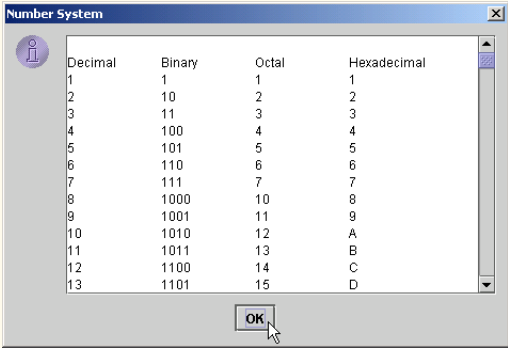
Write an application that prints a table of the binary, octal, and hexadecimal equivalents of
the decimal numbers in the range 1 through 256. If you are not familiar with these number systems, read Appendix C first. Place the results in a JTextArea with scrolling functionality. Display the JTextArea in a message dialog.


Number System in java


ANS:

import javax.swing.*;
public class NumberSystem {

public static void main( String args[] )
 {
 // create a scrolled pane for the output
JTextArea outputTextArea = new JTextArea( 15, 35 );
JScrollPane scroller = new JScrollPane( outputTextArea );
outputTextArea.append( "\nDecimal\tBinary\tOctal\tHexadecimal\n" );

 // print out binary, octal and hexadecimal representation
 // for each number
for ( int i = 1; i <= 256; i++ ) {
 int decimal = i;
 String binary = "", octal = "", hexadecimal = "";
 int temp;

 // get binary representation
 while ( decimal >= 2 ) {
 temp = decimal % 2;
 binary = temp + binary;
 decimal /= 2;
 }
 binary = decimal + binary;

decimal = i;

 // get octal representation
 while ( decimal >= 8 ) {
 temp = decimal % 8;
 octal = temp + octal;
 decimal /= 8;
 }
octal = decimal + octal;

 decimal = i;

 // get hexadecimal representation
 while ( decimal >= 16 ) {
 temp = decimal % 16;

switch ( temp ) {
 case 10:
hexadecimal = "A" + hexadecimal;
 break;
 case 11:
hexadecimal = "B" + hexadecimal;
 break;
 case 12:
hexadecimal = "C" + hexadecimal;
 break;
 case 13:
hexadecimal = "D" + hexadecimal;
 break;
case 14:
hexadecimal = "E" + hexadecimal;
 break;
 case 15:
 hexadecimal = "F" + hexadecimal;
 break;
default:
hexadecimal = temp + hexadecimal;
 break;
 }
 decimal /= 16;
 }
 switch ( decimal ) 
{
 case 10:
hexadecimal = "A" + hexadecimal;
 break;
case 11:
hexadecimal = "B" + hexadecimal;
 break;
case 12:
hexadecimal = "C" + hexadecimal;
break;
case 13:
 hexadecimal = "D" + hexadecimal;
 break;
 case 14:
 hexadecimal = "E" + hexadecimal;
 break;
 case 15:
 hexadecimal = "F" + hexadecimal;
 break;
 default:
 hexadecimal = decimal + hexadecimal;
 break;
 }
 outputTextArea.append( i + "\t" + binary + "\t" + octal + "\t" + hexadecimal + "\n" );
 }
 // show result
 JOptionPane.showMessageDialog( null, scroller,
 "Number System", JOptionPane.INFORMATION_MESSAGE );
// terminate the application
System.exit( 0 );
}
} // end class NumberSystem
Place where all sort of programming stuff and reviews,technology news are shared and Useful Project of C++,C,java C# etc

In this articles, I am using Listbox ,radio box ,check box,and textbox  Admission Form

Admission Form with List Box using C#

Program

using System;
using System.Collections.Generic;
using System.ComponentModel;
using System.Data;
using System.Drawing;
using System.Linq;
using System.Text;
using System.Threading.Tasks;
using System.Windows.Forms;

namespace Admission_Form_with_List_Box
{
     public partial class frmAdmission : Form
     {
          public frmAdmission()
          {
               InitializeComponent();
          }

          private void btnDisplay_Click(object sender, EventArgs e)
          {
               double mobt = 0, mtot = 0,
                         iobt = 0, itot = 0,
                         bobt = 0, btot = 0,
                         merit = 0;
               int hafiz = 0, computer = 0;
               if (chkHafiz.Checked)
               {
                    hafiz = 20;
               }
               if (chkComputer.Checked)
               {
                    computer = 10;
               }
               if (lstProgram.SelectedIndex != -1)
               {
                    if (lstProgram.SelectedItem.ToString() == "BS( CS )")
                    {
                         iobt = Convert.ToDouble(txtIObt.Text);
                         itot = Convert.ToDouble(txtITot.Text);
                         merit = (iobt + hafiz) / itot * 100;
                         txtMerit.Text = merit.ToString();
                         if (merit > 80)
                         {
                              txtRemarks.Text = "Congratulations...!";
                         }
                         else
                         {
                              txtRemarks.Text = "Wait for other merit list";
                         }
                    }
                    else if (lstProgram.SelectedItem.ToString() == "MCS")
                    {
                         mobt = Convert.ToDouble(txtMObt.Text);
                         mtot = Convert.ToDouble(txtMTot.Text);
                         merit += mobt / mtot * 30;
                         iobt = Convert.ToDouble(txtIObt.Text);
                         itot = Convert.ToDouble(txtITot.Text);
                         merit += iobt / itot * 30;
                         bobt = Convert.ToDouble(txtBObt.Text);
                         btot = Convert.ToDouble(txtBTot.Text);
                         merit += (bobt + hafiz + computer) / btot * 40;
                         txtMerit.Text = merit.ToString();
                         if (merit > 71)
                         {
                              txtRemarks.Text = "Congratulations...!";
                         }
                         else
                         {
                              txtRemarks.Text = "Wait for other merit list";
                         }
                    }
               }
          }

          private void lstProgram_SelectedIndexChanged(object sender, EventArgs e)
          {
               if (lstProgram.SelectedIndex != -1)
               {
                    if (lstProgram.SelectedItem.ToString() == "BS( CS )")
                    {
                         txtAppNo.Enabled = true;
                         txtName.Enabled = true;
                         txtMObt.Enabled = false;
                         txtMTot.Enabled = false;
                         txtIObt.Enabled = true;
                         txtITot.Enabled = true;
                         txtBObt.Enabled = false;
                         txtBTot.Enabled = false;
                    }
                    else if (lstProgram.SelectedItem.ToString() == "MCS")
                    {
                         txtAppNo.Enabled = true;
                         txtName.Enabled = true;
                         txtMObt.Enabled = true;
                         txtMTot.Enabled = true;
                         txtIObt.Enabled = true;
                         txtITot.Enabled = true;
                         txtBObt.Enabled = true;
                         txtBTot.Enabled = true;
                    }
               }
          }

          private void frmAdmission_Load(object sender, EventArgs e)
          {
               txtAppNo.Enabled = false;
               txtName.Enabled = false;
               txtMObt.Enabled = false;
               txtMTot.Enabled = false;
               txtIObt.Enabled = false;
               txtITot.Enabled = false;
               txtBObt.Enabled = false;
               txtBTot.Enabled = false;
          }

          private void btnClear_Click(object sender, EventArgs e)
          {
               lstProgram.ClearSelected();
               txtAppNo.Clear();
               txtName.Clear();
               txtAppNo.Enabled = false;
               txtName.Enabled = false;
               rdoMale.Checked = false;
               rdoFemale.Checked = false;
               chkComputer.Checked = false;
               chkHafiz.Checked = false;
               txtMObt.Enabled = false;
               txtMTot.Enabled = false;
               txtIObt.Enabled = false;
               txtITot.Enabled = false;
               txtBObt.Enabled = false;
               txtBTot.Enabled = false;
               txtMerit.Enabled = false;
               txtRemarks.Enabled = false;
               txtMObt.Clear();
               txtMTot.Clear();
               txtIObt.Clear();
               txtITot.Clear();
               txtBObt.Clear();
               txtBTot.Clear();
               txtMerit.Clear();
               txtRemarks.Clear();
          }

          private void btnExit_Click(object sender, EventArgs e)
          {
               this.Close();
          }
    }
}
Place where all sort of programming stuff and reviews,technology news are shared and Useful Project of C++,C,java C# etc
This article shows you how to insert, update, delete,search by name ,Roll no,marks and display data in Listbox 


Insert Update Delete and Search Data in local databases Using C#

Introduction

Here I am using  local databases.
Note: You need to include this assembly reference.
 using MySql.Data.MySqlClient;

SQL Connection: 

First, you need to  establish Local database connection for  databases 


namespace SQL_Database
{
    public partial class Form1 : Form
    {// Delcare Sql class objects
        SqlConnection cn;
        SqlDataAdapter da;
        DataSet ds;
        public Form1()
        {
            InitializeComponent();
        }

        private void Form1_Load(object sender, EventArgs e)
        {
            String con_str = @"Data Source=(local);Initial Catalog=BZU;Integrated Security=True";
            cn = new SqlConnection(con_str);

            try
            {
                cn.Open();   // open database connection
            }
            catch (Exception ex)
            {
                MessageBox.Show(ex.Message);
            }
        }

Insert Data

private void button1_Click(object sender, EventArgs e)
        {
            String query = "Insert into Student(RollNo, Name, Marks) Values(@RollNo, @Name, @Marks)";
            SqlCommand cmd = new SqlCommand(query, cn);

            cmd.Parameters.Add("@RollNo", SqlDbType.VarChar, 15);
            cmd.Parameters.Add("@Name", SqlDbType.VarChar, 50);
            cmd.Parameters.Add("@Marks", SqlDbType.Int);

            cmd.Parameters["@RollNo"].Value = textBox1.Text;
            cmd.Parameters["@Name"].Value = textBox2.Text;
            cmd.Parameters["@Marks"].Value = textBox3.Text;

            try
            {
                int i = cmd.ExecuteNonQuery();
                if (i == 0)
                    MessageBox.Show("No Record inserted");
                if (i == 1)
                    MessageBox.Show("One Record inserted into database Successfully");
                ClearFields();
            }
            catch (SqlException ex)
            {
                MessageBox.Show(ex.Message);
            }
        }
        private void ClearFields()
        {
            textBox1.Clear();
            textBox2.Clear();
            textBox3.Clear();
        }

Update Data

 private void button2_Click(object sender, EventArgs e)
        {
            string query = "Update Student Set Name=@Name,Marks=@Marks where RollNo=@RollNo ";
            SqlCommand cmd = new SqlCommand(query, cn);

            cmd.Parameters.Add("@Name", SqlDbType.VarChar, 50);
            cmd.Parameters.Add("@Marks", SqlDbType.Int);
            cmd.Parameters.Add("@RollNo", SqlDbType.VarChar, 15);

            cmd.Parameters["@Name"].Value = textBox2.Text;
            cmd.Parameters["@Marks"].Value = int.Parse(textBox3.Text);
            cmd.Parameters["@RollNo"].Value = textBox1.Text;
            try
            {
                int i = cmd.ExecuteNonQuery();
                if (i == 0)
                    MessageBox.Show("Record not found");
                if (i == 1)
                    MessageBox.Show("One Record updated successfully");
                ClearFields();
            }

            catch (SqlException ex)
            {
                MessageBox.Show(ex.Message);
            }
        }

Delete Data

private void button3_Click(object sender, EventArgs e)
        {
            String query = "Delete from Student Where RollNo=@RollNo";
            SqlCommand cmd = new SqlCommand(query, cn);
            cmd.Parameters.Add("@RollNo", SqlDbType.VarChar, 10);
            cmd.Parameters["@RollNo"].Value = textBox1.Text;

            try
            {
                int i = cmd.ExecuteNonQuery();
                if (i == 0)
                    MessageBox.Show("Record not found");
                if (i == 1)
                    MessageBox.Show("One Record Deleted Successfully");
                ClearFields();
            }
            catch (SqlException ex)
            {
                MessageBox.Show(ex.Message);
            }
        }

Display Data

   private void button6_Click(object sender, EventArgs e)
        {
            try
            {
                String query = "Select * from Student";
                da = new SqlDataAdapter(query, cn);
                ds = new DataSet();
                da.Fill(ds, "Students");
                dgStudent.DataSource = ds;
                dgStudent.DataMember = "Students";
                dgStudent.Refresh();
            }
            catch (SqlException ex)
            {
                MessageBox.Show(ex.Message);
            }
        }

Search By Name

private void button5_Click(object sender, EventArgs e)
        {
            String query = "Select * from Student where Name = @Name";
            SqlCommand cmd = new SqlCommand(query, cn);

            cmd.Parameters.Add("@Name", SqlDbType.VarChar, 50);
            cmd.Parameters["@Name"].Value = textBox2.Text; 
            SqlDataAdapter da = new SqlDataAdapter();
            da.SelectCommand = cmd;

            try
            {
                DataSet ds = new DataSet();
                da.Fill(ds, "Students");
                dgStudent.DataSource = ds;
                dgStudent.DataMember = "Students";
                dgStudent.Refresh();
            }
            catch (SqlException ex)
            {
                MessageBox.Show(ex.Message);
            }
        }

Search By RollNo

private void button4_Click(object sender, EventArgs e)
        {
            String query = "Select * from Student where RollNo = @RollNo";
            SqlCommand cmd = new SqlCommand(query, cn);

            cmd.Parameters.Add("@RollNo", SqlDbType.VarChar, 10);
            cmd.Parameters["@RollNo"].Value = textBox1.Text;
            SqlDataAdapter da = new SqlDataAdapter();
            da.SelectCommand = cmd;

            try
            {
                DataTable dt = new DataTable();
                da.Fill(dt);
                if (dt.Rows.Count == 0)
                    MessageBox.Show("Record not found");
                else
                {
                    textBox2.Text = dt.Rows[0]["Name"].ToString();
                    textBox3.Text = dt.Rows[0]["Marks"].ToString();
                }
            }
            catch (SqlException ex)
            {
                MessageBox.Show(ex.Message);
            }
        }

Search By Marks

private void button7_Click(object sender, EventArgs e)
        {
            String query = "Select * from Student where Marks = @Marks";
            SqlCommand cmd = new SqlCommand(query, cn);

            cmd.Parameters.Add("@Marks", SqlDbType.Int);
            cmd.Parameters["@Marks"].Value = Convert.ToInt32(textBox3.Text);
            SqlDataAdapter da = new SqlDataAdapter();
            da.SelectCommand = cmd;

            try
            {
                DataSet ds = new DataSet();
                da.Fill(ds, "Students");
                dgStudent.DataSource = ds;
                dgStudent.DataMember = "Students";
                dgStudent.Refresh();
            }
            catch (SqlException ex)
            {
                MessageBox.Show(ex.Message);
            }
        }
Place where all sort of programming stuff and reviews,technology news are shared and Useful Project of C++,C,java C# etc
(Mortgage Calculator Application) A bank offers mortgages that can be repaid in 5 ,10, 15, 20, 25 or 30 years. Write an application that allows a user to enter the price of a house (the amount of the mortgage) and the annual interest rate. When the user clicks a Button, the application displays a table of the mortgage length in years together with the monthly payment.


Mortgage Calculator Application in C#

Solution :

using System;
using System.Collections.Generic;
using System.ComponentModel;
using System.Data;
using System.Drawing;
using System.Linq;
using System.Text;
using System.Threading.Tasks;
using System.Windows.Forms;

namespace Mortgage_Calculator_Application
{
    public partial class Form1 : Form
    {
        public Form1()
        {
            InitializeComponent();
        }

        private void button1_Click(object sender, EventArgs e)
        {

            int intMortgageAmount = 0; // house price
            double dblAnnualRate = 0; // annual interest rate
            double dblMonthlyRate = 0;
            decimal decPayment = 0; // monthly payment amount
            int intYears = 5; // years in mortgage
            int intMonths = 0;
            
            intMortgageAmount = Int32.Parse(txtMortgageAmount.Text);
            dblAnnualRate = Double.Parse(txtRate.Text) / 100;
            // calculate monthly interest rate
            dblMonthlyRate = dblAnnualRate / 12;
            lstResults.Items.Clear();
            lstResults.Items.Add(
            "Mortgage Length (Years)\tMonthly Payment");
            // perform payment calculation and display result for
            // 5, 10, 15, 20, 25 and 30 years
            while (intYears <= 30)
            {
                // convert years to months for the calculation
                intMonths = intYears * 12;
                // perform calculation
                decPayment = (decimal)
                (intMortgageAmount * dblMonthlyRate * 
                Math.Pow(1 + dblMonthlyRate, intMonths) / 
               (Math.Pow(1 + dblMonthlyRate, intMonths)- 1));
               
                lstResults.Items.Add(intYears + "\t\t\t" +
                String.Format("{0:C}", decPayment));
                intYears += 5;
            } 
        } 

    }
    }
Place where all sort of programming stuff and reviews,technology news are shared and Useful Project of C++,C,java C# etc
(Table of Powers Application) Write an application that displays a table of numbers from 1 to an upper limit, along with each number’s square value  (for example, the number n to the power 2, or n ^ 2) and cubed value (the number n to the power 3, or n ^ 3). The users should specify the upper limit, and the results should be displayed in a ListBox, as  shown below 

Table of Powers Application in C#

Solution

using System;
using System.Collections.Generic;
using System.ComponentModel;
using System.Data;
using System.Drawing;
using System.Linq;
using System.Text;
using System.Threading.Tasks;
using System.Windows.Forms;

namespace Table_of_Powers_Application
{
    public partial class Form1 : Form
    {
        public Form1()
        {
            InitializeComponent();
        }

        private void button1_Click(object sender, EventArgs e)
        {

            int intLimit = 0; 
            int intCounter = 1;

            lstResults.Items.Clear();
            intLimit = Int32.Parse(txtInput.Text);
            lstResults.Items.Add("N\tN^2\tN^3");
            
            while (intCounter <= intLimit)
            {
                lstResults.Items.Add(intCounter + "\t" +
                Math.Pow(intCounter, 2) + "\t" +
                Math.Pow(intCounter, 3));
                intCounter++;
            }
        }

        private void txtInput_Click(object sender, EventArgs e)
        {
            lstResults.Items.Clear();
        }
    }
    }
Place where all sort of programming stuff and reviews,technology news are shared and Useful Project of C++,C,java C# etc
(Inventory Enhancement) Extend the Inventory application to include a TextBox in
which the user can enter the number of shipments received in a week . Assume every shipment has the same number of cartons (each of which has the same number of items).Then, modify the code so that the Inventory application uses that value in its calculation.

Inventory Enhancement

Solution:

using System;
using System.Collections.Generic;
using System.ComponentModel;
using System.Data;
using System.Drawing;
using System.Linq;
using System.Text;
using System.Threading.Tasks;
using System.Windows.Forms;

namespace Inventory_Enhancement
{
public partial class Form1 : Form
{
public Form1()
{
InitializeComponent();
}
private void button1_Click(object sender, EventArgs e)
{

lblTotalResult.Text = Convert.ToString(
Int32.Parse(txtCartons.Text) *
Int32.Parse(txtItems.Text) *
Int32.Parse(txtShipments.Text));
}
}
}
no image
Place where all sort of programming stuff and reviews,technology news are shared and Useful Project of C++,C,java C# etc
Write a Program in C# to find the roots of Quadratic Equation. 

Solution:

using System;
class Quad
{
public static void Main()
{
int A, B, C;
double disc, deno, x1, x2;
Console.WriteLine("ENTER THE VALUES OF A,B,C..."); A=int.Parse(Console.ReadLine());
B=int.Parse(Console.ReadLine());
C=int.Parse(Console.ReadLine());
disc = (B * B) - (4 * A * C);
deno = 2 * A;
if(disc > 0)
{
Console.WriteLine("THE ROOTS ARE REAL ROOTS");
x1 = (-B/deno) + (Math.Sqrt(disc) / deno);
x2 = (-B/deno) - (Math.Sqrt(disc) / deno);
Console.WriteLine("THE ROOTS ARE...: {0} and {1}", x1, x2);
}
else if(disc == 0)
{
Console.WriteLine("THE ROOTS ARE REPEATED ROOTS");
x1 = -B/deno;
Console.WriteLine("THE ROOT IS...: {0}", x1);
}
else
{
Console.WriteLine("THE ROOTS ARE IMAGINARY ROOTS\n");
x1 = -B/deno;
x2 = ((Math.Sqrt((4*A*C)-(B*B))) / deno);
Console.WriteLine("THE ROOT ONE...: {0}+i{1}", x1, x2); Console.WriteLine("THE ROOTS ARE...: {0}-i{1}", x1, x2);
}
}}
no image
Place where all sort of programming stuff and reviews,technology news are shared and Useful Project of C++,C,java C# etc
 Write a Program in C# to Check whether a number is Palindrome or not.

Solution :

using System;
class Palindrome
{
public static void Main( )
{
//Declaring the variables
int num;
int initial_num;
int digit;
int reverse_number = 0;
//prompt the user for a number
Console.WriteLine("*******************");
Console.WriteLine("Provide a number");
Console.WriteLine("*******************");
Console.WriteLine("\r\n");
//read in the users input
initial_num = int.Parse(Console.ReadLine());
num = initial_num;
do
{
//set digit to the users number mod 10
digit = initial_num % 10;
//reverse the number by multiplying it by 10 then
//adding digit to it
reverse_number = reverse_number * 10 + digit;
initial_num /= 10;
} while (initial_num != 0);
//print out the number reversed
Console.WriteLine("************************");
Console.WriteLine("The reverse of the numer is: {0}", reverse_number);
Console.WriteLine("************************");
Console.WriteLine("\r\n");
//now check to see if the number is a palidrome
if (num == reverse_number)
{
//since the number entered = the number reversed it is a palindrome
Console.WriteLine("*******************************");
Console.WriteLine("This number is a palindrome!");
Console.WriteLine("*******************************");
Console.WriteLine("\r\n");
}
else
{
//number is not a palidrome
Console.WriteLine("*******************************");
Console.WriteLine("This number is not a palindrome");
Console.WriteLine("*******************************");
}
}